

Client Scoped Manual Overrides
What you need to know:
- We have added the ability to scope overridden limits to a client-debtor pair
- A Client scoped limit overrides is always the applied limit when set (see Credit Limit Hierarchy for more info)
- Client scoped limit overrides are automatically carried from prospects to active clients and do not expire
Client scoped overrides are a new type of override, which allow a user to treat a client-debtor pair differently from any other client associated with that debtor in the system.
An example of where this is useful is when a client has their own insurance policy - in this event, that client will have a different credit limit for that debtor compared to every other client in the system.
A worked example of this is provided below to help conceptualise these limits.
Adding a Client Scoped Manual Override
To add a client scoped manual override:
- Open the debtor credit limit modal
- If the Allianz insurance integration is enabled, ensure that the "Manual Override" tab is selected
- Enter the new limit for the client-debtor pair
- Check the "Only apply override to this client" box
- Click Submit/Confirm to save the limit
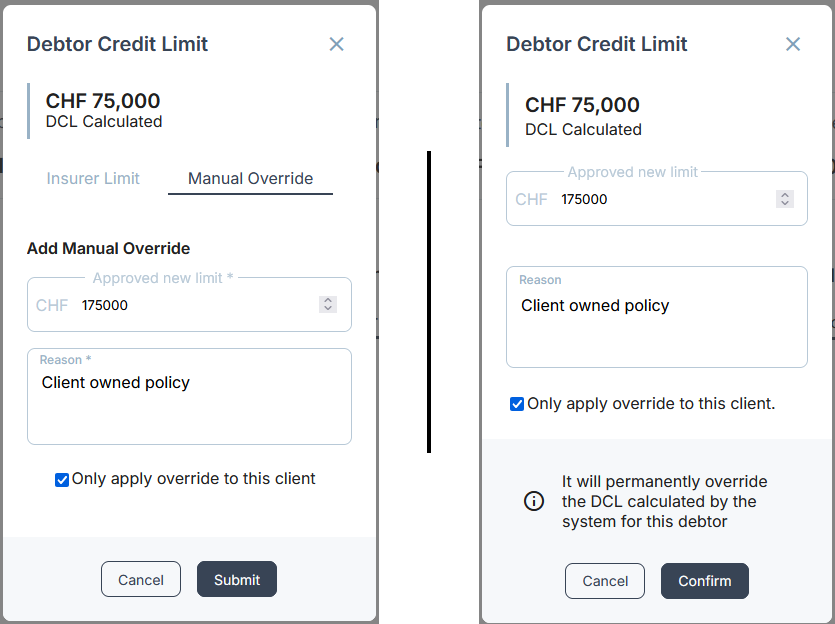
A completed client scoped override request, with the insurer integration enabled (left), and without (right)
The process of updating a client scoped manual override is exactly the same as adding a new one
Removing a Client Scoped Manual Override
Removing a client scoped manual override is not currently possible by users. If an override is accidentally set against an incorrect client, please contact support. If the amount is incorrect, the amount can be corrected by following the steps above.
Worked Example
- There are 3 clients in the system (Client A, Client B, Client C)
- Client C has their own insurance policy which is being used for debtor credit limits
- All 3 clients have a portfolio debtor in the system, Debtor D
- For Clients A & B, Debtor D has a DCL of 75,000
- Client C has insurance coverage of 175,000 for Debtor D
- To manage this, a client scoped override is added for 175,000 for Debtor D on Client C.
- After applying the override, Debtor D will have the following credit limits
- Client A: 75,000
- Client B: 75,000
- Client C: 175,000
Credit Limit Hierarchy
Client scoped credit limits are a new addition to the credit limit hierarchy. When set, a client scoped credit limit is always the applied limit, the new order of hierarchy is:
- Client Scoped Limit Overrides
- Manual Overrides
- Insurer Obtained Limits
- Calculated DCL