

Improved
Manually Setting Company ID
almost 2 years ago by Chris Caskey
What you need to know:
- We have added a way for some users to manually set a debtor's insurer company ID
- This is doable by users with the
collateral_management.insure.redrive_limit_requestscope- This functionality is only visible if a debtor has a pending cover request, and no insurer company ID
When making an insurance cover request, some debtors have to go through an offline process to be assigned an insurer company ID (may also be referred to as an EHID). When this happens, the pending request for that debtor will be stuck in a pending state.
The new functionality to manually set the insurer company ID allows users with permissions set to manually enter the insurer company ID in the Collateral Management tool. When the insurer company ID is set, the pending cover request is automatically resubmitted to the insurer.
When a Company ID can be set
An insurer company ID can be manually set when 3 conditions are met:
- The user attempting to set the ID has the
redrive limit requestpermission - The debtor has a pending insurance cover request
- The debtor does not have a company ID already assigned
Process
- Submit the cover request for the debtor
- Complete the offline process to get a company ID for the debtor
- Open the "Debtor Credit Limit" modal, and click the "Set Company ID and Re-request" button (pictured below)
- Enter the insurer company ID for the debtor and click submit
- If the request fails, an error message will appear. The company ID can be edited, if required, and resubmitted
- Wait for the insurer to process the cover request for the debtor
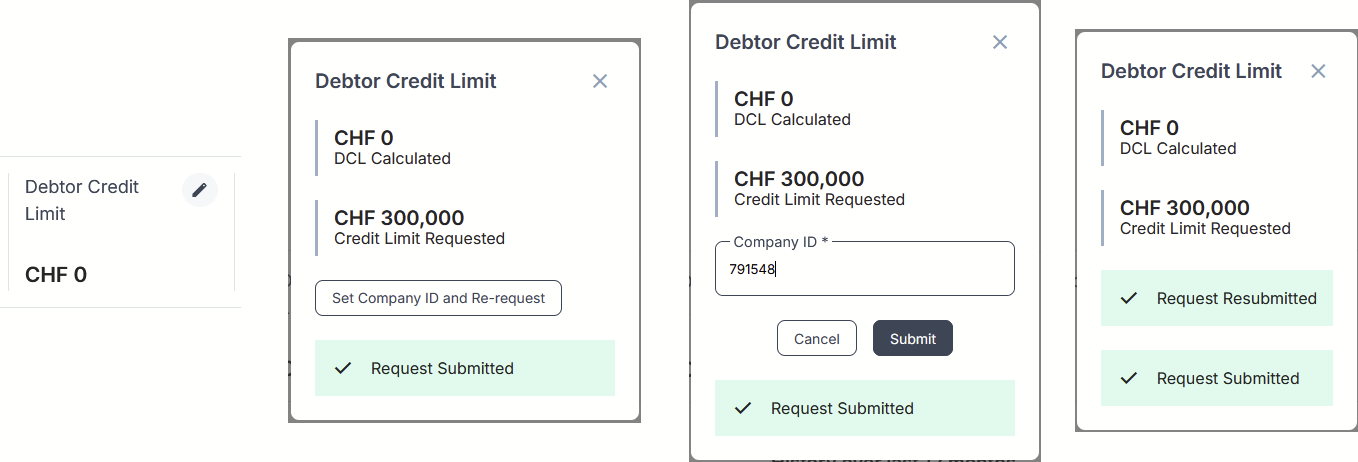
How the credit limit modal will appear as a user progresses through the resubmission
Important:
- When submitting the debtor's insurer company ID, the system will verify that the company ID is valid but it does not verify that the ID is for the correct company
- If an error has been made and an incorrect company ID has been entered, you must contact support to resolve this